
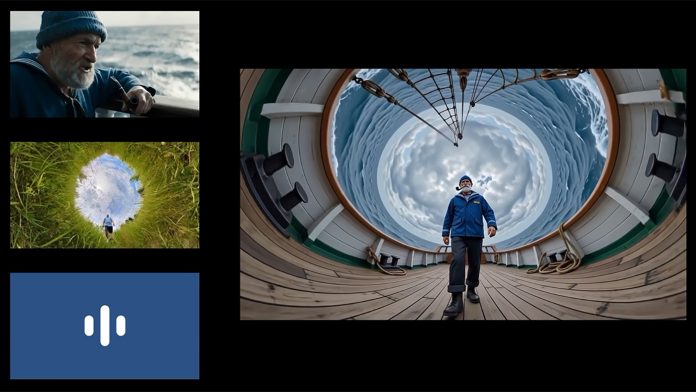
Google has launched the next generation of its Gemini family of artificial intelligence models. The company says Gemini Omni combines Gemini’s ability to reason with the ability to create. Even more boldly, Google claims Omni can “create anything from any input — starting with video.” What can Gemini Omni do, and what does it offer video shooters?
Multimodal AI
Google says it designed Gemini to be natively multimodal from the start. In the past, AI was limited to one form of data. Multimodal AI can process and generate every type, including text, images, audio and video. That lets you combine different media samples with text inputs to build prompts that the AI can use to generate content. You can work with your own existing footage and guide the AI to shape it as you need.
Gemini Omni
Gemini Omni pushes multimodal AI further. You can feed it any combination of video, audio, text and images to generate high-quality videos. You can also edit those videos through natural language conversation, then keep adding instructions to build on earlier prompts. That way you shape what Gemini Omni creates without starting from scratch. Google says your characters stay consistent and the scene remembers what came before.
World model
Google also claims the videos are “grounded in Gemini’s real-world knowledge.” The AI doesn’t just create images and video. It understands how physics works, as well as cultural context and world history. Objects in an Omni clip should behave as they would in reality. You don’t need to tell Omni how high a basketball will bounce, because it already knows. Ask it for a video set in 1920s Chicago, and Omni will recognize the buildings that fit the period and use them accordingly.
What can Gemini Omni do?
Google has shared some impressive samples created with Gemini Omni.
VFX work
This clip of a man filming himself in a mirror was altered with the prompt “when the person touches the mirror, make the mirror ripple beautifully like liquid, and the person’s arm turns into reflective mirror material.” It’s a complicated effect that would usually call for rotoscoping or green-screen work, plus computer-generated imagery.
Refine your content
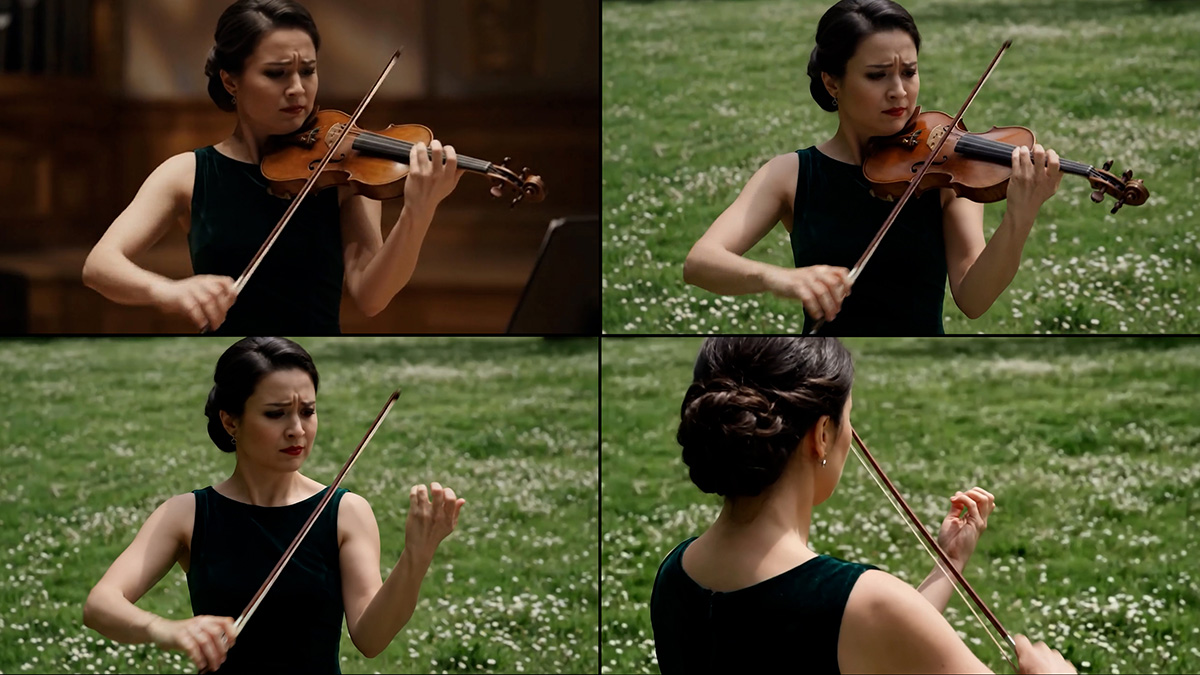
Google also showed how you can refine a video by building on earlier results. Gemini Omni generated the first clip from the simple prompt “a video of a violinist playing a song.” Later prompts did more. The AI switched the location to match a source image. It then made the violin invisible and changed the camera angle.
Adding graphics
Adding animated graphics to a video typically requires motion tracking and takes a lot of time. Google handed Gemini Omni a video of a skateboarder along with some sample graphics. The AI composited everything in response to the prompt “edit this keeping everything the same. Add animated motion effects coming out of the skateboard.”
Motion capture
In another sample, Gemini Omni replaced a man walking around a museum with an animated character. The prompt read “Apply the pose and the motion from input video to provided character from this image. Apply style from image reference to the new video.” The technique could stand in for complex motion-capture work while keeping the human element of a performance.
Animated content
One video shows Gemini Omni handling complex factual animation. The AI built a science-based explainer from the prompt “Claymation explainer of protein folding, everything is made out of clay, no hands, stop motion, accurate.” Content like this comes with a caveat. Google’s own disclaimer warns that “Gemini is AI and can make mistakes, including about people.” You’d want to verify the facts independently before publishing.
How can video shooters use Gemini Omni?
Gemini Omni opens up new post-production options. Take changing the design on a character’s T-shirt. It’s doable today, but it can mean complex masking, rotoscoping and compositing. That work can run past the skill or budget of a solo videographer, or even a small indie production. With Gemini Omni, you describe the change in plain language and supply a reference image for the new design.
Green-screen shoots may become optional for VFX work. Film your subject wherever you like, then prompt the AI to drop the background. The tool handles bigger changes too. It can take a shot of someone walking in a park and swap the setting for a futuristic cityscape while the subject and their movement stay put. Want a different camera angle? Gemini Omni can deliver that and match your reference images.
Ask Gemini Omni to add rain, and it won’t simply overlay an effect or drop in stock video. Its grasp of the real world puts puddles, splashes and spray where they would naturally fall. Gemini Omni can also generate new audio, with sound effects synced to the footage it creates. No Foley, no dubbing in post-production. The clip is ready the moment Gemini Omni finishes it.
How realistic is Gemini Omni output?
One term that comes up often in AI-generated content is the “uncanny valley.” It’s the psychological space where something looks almost real but feels a little off. Viewers find the result unsettling, though they can’t quite say why.
Google has shared videos of human subjects that appear highly accurate, but they run for only a few seconds. The company also picked its strongest examples. In practice, you might need many iterations before your footage matches your expectations. How Gemini Omni handles messier real-world content, and whether it clears the uncanny-valley test, remains to be seen.
Digital watermarks
As generative AI grows more convincing, one of the biggest worries is the rise of deepfake videos. Google says it developed Gemini Omni Flash with its internal safety, security and responsibility teams. Content the AI creates, or edits, carries Google’s SynthID watermark along with C2PA Content Credentials. Those markers make it easy to flag Gemini Omni footage as AI-generated rather than real. Google adds that it conducted extensive automated and human evaluations of the model to ensure it adheres to safety policies, so the AI should refuse to produce offensive or harmful content.
How to try Gemini Omni
Google has launched the first model in the family, Gemini Omni Flash. It’s rolling out to subscribers of Google’s AI Plus, AI Pro and AI Ultra through the Gemini app and Google Flow. AI Plus runs $8 a month. AI Pro costs $19.99, and AI Ultra tops out at $100. Gemini Omni Flash will also be free for users on YouTube Shorts and the YouTube Create app.
Generative AI splits opinion. Some people welcome what it can do. Others reject any use of AI to make video, and much of that pushback centers on copyright, since questions remain over the work used to train these models.
Gemini Omni can build from scratch, but it also gives you plenty of room to reshape your own footage. It hands video makers creative tools that once belonged to major studios with huge budgets. Expect it to catch on fast, shaping the clips shared online and feeding into independent film work. The flip side is real, though. VFX artists may fear for their livelihoods if major studios lean on the technology.

