
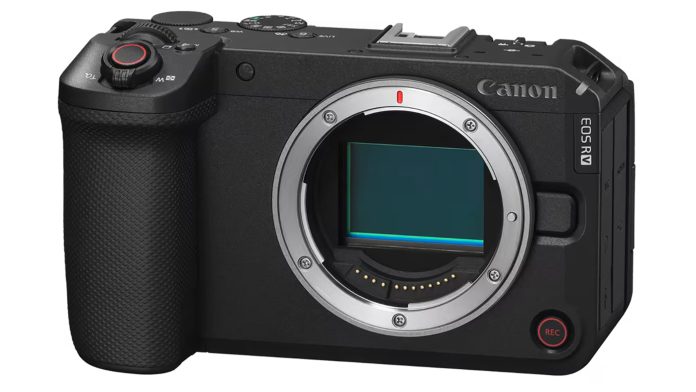
Canon has made mirrorless cameras with strong video features for years. Many of them still feel like photo cameras that happen to shoot great video.
The Canon EOS R6 V feels different.
Canon calls the R6 V a camera built for video capture, and the design backs that up. There’s no electronic viewfinder. In its place, Canon added a cooling fan, a front record button and a tally light. A power zoom control sits on top. The menus carry real exposure tools like false color and a waveform monitor.
The spec sheet leans the same way. The R6 V records 7K RAW and oversampled 4K at up to 60 frames per second. Uncropped 4K runs to 120 fps. There’s also open gate, which records the full 3:2 sensor area instead of cutting out a widescreen frame.
At $2,499 for the body, the R6 V lands between a typical mirrorless camera and a full cinema camera. That may be exactly where Canon wants it. The real question is whether all of these features make shooting easier or only make the spec sheet look better. For the bulk of what we shot, they make the camera better. There are limits, though, and we’ll get to those.
A 32.5-megapixel full-frame sensor
The R6 V pairs a 32.5-megapixel full-frame CMOS sensor with Canon’s DIGIC X processor. That sensor gives you several ways to record. You can shoot 7K RAW or 7K open gate. Standard 4K is there, along with an oversampled mode Canon calls 4K Fine. You also get 4K at up to 120 fps. That’s a lot of choices, and each one earns its place.
4K Fine starts with more image information than it needs and scales it down to 4K. The payoff is a sharper image with finer detail. The cost is speed. In our testing, standard 4K showed a typical amount of rolling shutter, the skew you get when the sensor reads the frame line by line during fast movement. 4K Fine showed noticeably more.
That difference should drive your choice. For an interview or a controlled product shot, we’d take the extra detail of 4K Fine. Sports and quick camera moves call for standard 4K, since the sensor reads much faster there.
You’ll see that theme throughout this review. No single recording mode is best at everything. Canon gives you options and trusts you to pick.
7K RAW is powerful, but it comes at a cost
The R6 V records 12-bit 7K Canon RAW internally. RAW keeps everything the sensor captured, which gives you far more control during heavy color work. Standard 7K RAW runs at up to 29.97 fps. RAW Light pushes that to 59.94 fps.
That sounds great until you look at file sizes. At its highest data rate, standard 7K RAW hits about 2.6 gigabits per second. That works out to roughly 19 GB per minute. Ten minutes gets close to 200 GB, and an hour can pass 1 TB.
Now the conversation changes. You need fast CFexpress Type B cards and somewhere to offload them. Then you need a second copy for backup. Your computer also has to keep up with the files. Internal RAW isn’t free because it’s built into the camera.
A commercial or an effects-heavy short film may be worth that cost. For a two-hour interview, we’d have a hard time justifying it. Thankfully, you don’t have to.
The R6 V also records 10-bit 4:2:2 video, which keeps far more color information than an 8-bit file without RAW’s storage bill. That’s where we’d expect plenty of professional shoots to live. Save RAW for the jobs where it solves a problem.
Canon Log 2 is a welcome addition
You get both Canon Log 2 and Canon Log 3. Each records a flat image that holds more highlight and shadow detail for grading. Canon Log 3 is easier to work with and will cover plenty of projects. Canon Log 2 makes more sense when you want to push the image harder or match the R6 V to Canon’s cinema cameras.
That matching ability makes the R6 V a strong B camera. Put your larger cinema camera on a tripod for the main shot. The R6 V can ride a gimbal or slider, where its small size becomes an advantage. Shooting Canon Log 2 on both gives you a better starting point when you match them in the grade.
Log isn’t magic, though. Brighten a badly underexposed shot and the noise comes with it. Blow out a window completely and there may be nothing left to recover. You still need to nail exposure. Fortunately, Canon gives you good tools for that.
False color and waveform are more useful than 7K
The R6 V includes false color and a waveform monitor, and we’d reach for them more often than 7K RAW. False color paints the image by brightness, so a hot highlight or crushed shadow jumps out right away. The waveform graphs brightness across the frame.
Both let you set exposure without trusting the LCD. That matters, because a screen can fool you. Bright sun makes it look dark. A dark room makes it look bright. The waveform doesn’t care about either.
Zebras are here too, with striped overlays that appear once part of the image passes a set brightness. These are real video tools. They won’t sell cameras the way 7K does, but they’ll improve your footage every time you shoot.
There’s one catch. Canon won’t let every monitoring tool run at the same time, and we’d like more freedom to choose what’s on screen. Still, we’re glad they’re there.
Open gate makes a lot of sense today
The R6 V records 7K open gate at up to 29.97 fps. Instead of cutting a widescreen frame out of the sensor, open gate uses the full 3:2 area. You end up with a taller image.
That’s useful because one shoot often has to feed several videos. You might need a 16:9 cut for YouTube and a 9:16 version for Reels or Shorts. Open gate gives the editor extra room above and below the subject, so both versions can come from the same shot.
It won’t compose the shot for you. If two people stand on opposite sides of a wide frame, they may not both fit in a vertical crop. You still have to think about where the video is headed while you’re rolling.
In our testing, open gate also showed more rolling shutter than standard 4K. We’d happily use it for an interview, but we’d think twice before pointing it at fast sports. Again, pick the mode for the shot.
4K 120p is a bigger deal than 7K
If you shoot action, 4K 120p may matter more to you than 7K RAW. The R6 V records DCI or UHD 4K at up to 119.9 fps with audio, and it doesn’t crop into the sensor. Drop that footage on a 24 fps timeline and it plays back at about one-fifth speed.
That’s great for sports and weddings. It’s also a gift for music videos and product B-roll.
Sensor readout is fast in this mode, which is exactly what you want. You’re usually filming movement at 120 fps, and quick readout keeps that movement from bending across the frame.
The trade-off is detail. 4K 120p doesn’t use the oversampling behind 4K Fine. If you want maximum detail, pick 4K Fine. If you want slow motion, pick 4K 120p. We’re glad Canon offers both.
Autofocus makes the R6 V easier to use alone
The R6 V uses Canon’s Dual Pixel CMOS AF II system. In our hands-on testing, subject tracking was quick and dependable. It recognizes people and animals. Vehicles are covered, too. You can also register specific people so the camera knows whom to favor when several faces share the frame.
That’s a big deal for a one-person crew. Picture walking backward with a gimbal while someone walks toward you. You’re already juggling framing and exposure. You’re also trying not to trip over anything. If the camera handles focus reliably, that’s one less job on your plate.
Good video autofocus isn’t only about speed. Sometimes you want focus to ease slowly between subjects. Other times you want it to ignore someone crossing the background. The R6 V lets you tune how autofocus reacts, so you can shape its behavior for each shot.
Manual focus shooters get focus peaking, which outlines the in-focus areas in color. It’s a simple tool, and it works.
IBIS helps, but it is not a gimbal
In-body image stabilization moves the sensor to cancel small hand shakes. Canon rates it at up to 7.5 stops at the center of the frame under its test conditions. It also works with stabilized lenses, and the camera adds digital stabilization on top.
In practice, IBIS does a good job calming handheld footage. Don’t read 7.5 stops and toss your tripod, though. IBIS handles small movements well. It can’t remove the up-and-down bounce of walking. A gimbal or shoulder rig still has a job.
Digital stabilization smooths things further, but it crops into the frame. That trade can be worth it when you need the help. Know what you’re giving up first.
The cooling fan changes the camera
The original EOS R6 became known for its heat limits nearly as much as for its video quality. The R6 V takes a different approach with a cooling fan built into the body.
A fan doesn’t sound exciting. It’s still one of the camera’s biggest upgrades. Canon rates 7K RAW Light at 59.94 fps with a 2K proxy at 120 minutes or longer at 73 F. 4K Fine at 59.94 fps gets the same 120-minute-or-longer rating. Under the same 73 F conditions, Canon lists no heat restriction for standard 4K at 119.9 or 59.94 fps. 7K open gate MP4 at 29.97 fps is unrestricted too.
That’s a big change. We still wouldn’t call the R6 V impossible to overheat, and neither does Canon. A 10-step temperature display keeps you informed, and the camera can shut down if it gets too hot.
A summer wedding in direct sun is not a 73 F lab. Neither is a hot car or a sunny sideline. Heat is still worth watching. The difference is that the R6 V now has a real system for dealing with it, which makes us much more comfortable using it on long shoots.
Six-hour recording changes what this camera can do
Below 100 fps, the R6 V can record a single clip for up to six hours. At 100 fps and above, the limit is two hours. A hot camera or a full card can still stop you sooner. So can a dead battery.
Even so, that opens the camera to far more than short films. Interviews and conferences fit. So do concerts and livestreams, along with long podcast tapings.
For plenty of working shooters, this may matter more than 7K. A camera that makes a beautiful image for 15 minutes is useful. One that keeps making it for hours can take on more jobs.
Pre-recording could save a shot
The R6 V offers three- or five-second pre-recording. With it on, the camera keeps a short rolling buffer, so the saved clip includes the moments before you pressed record.
That can be a lifesaver for sports and wildlife. News and documentary shooters will love it, too. You can’t always predict the moment. Sometimes you see it and react. Pre-recording gives you a small safety net. It doesn’t work in every recording mode, but when you need it, you’ll be glad it’s there.
The body makes sense for video
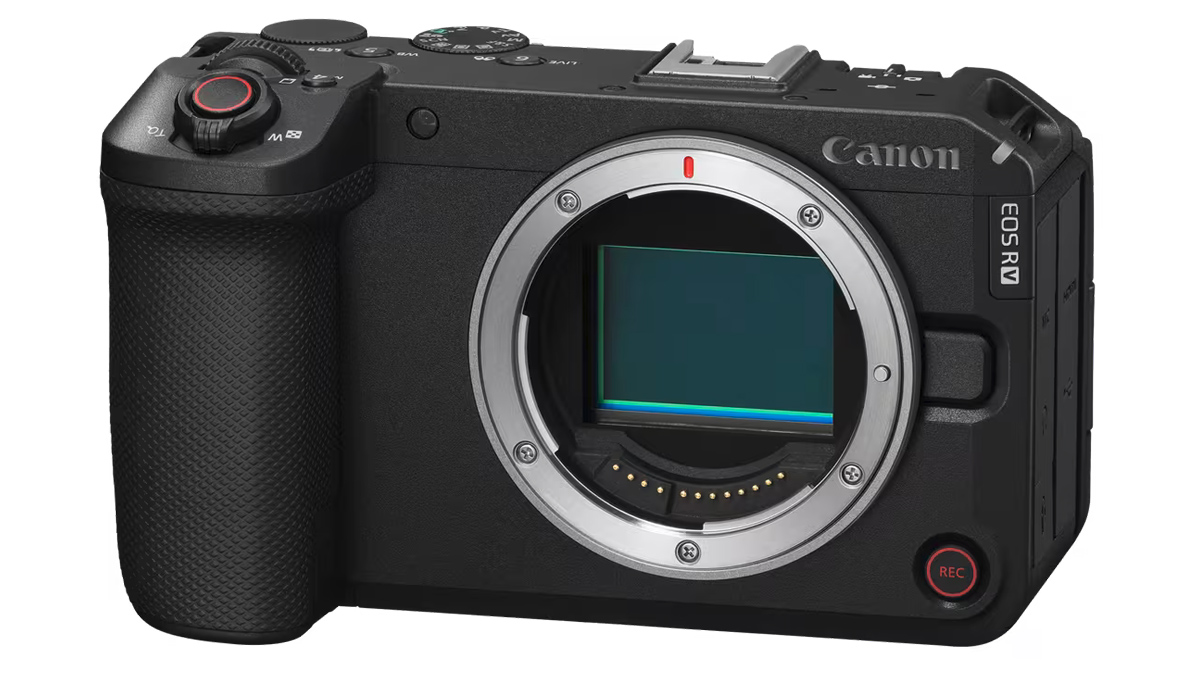
There’s no electronic viewfinder and no mechanical shutter. Photographers will notice both. For a video-first camera, the choices make sense.
Dropping the viewfinder gives the R6 V a flatter top, which makes it easier to rig with a monitor or microphone. Canon also added a front record button and a tally light that shows when you’re rolling, which is handy when you’re filming yourself. A power zoom lever drives compatible power zoom lenses without touching the lens.
There’s a vertical tripod mount, too, and the interface rotates when you turn the camera on its side. Is Canon chasing content creators? Yes. But social video is part of modern production, and making vertical shooting easier is a good thing.
The rear screen is a weak point
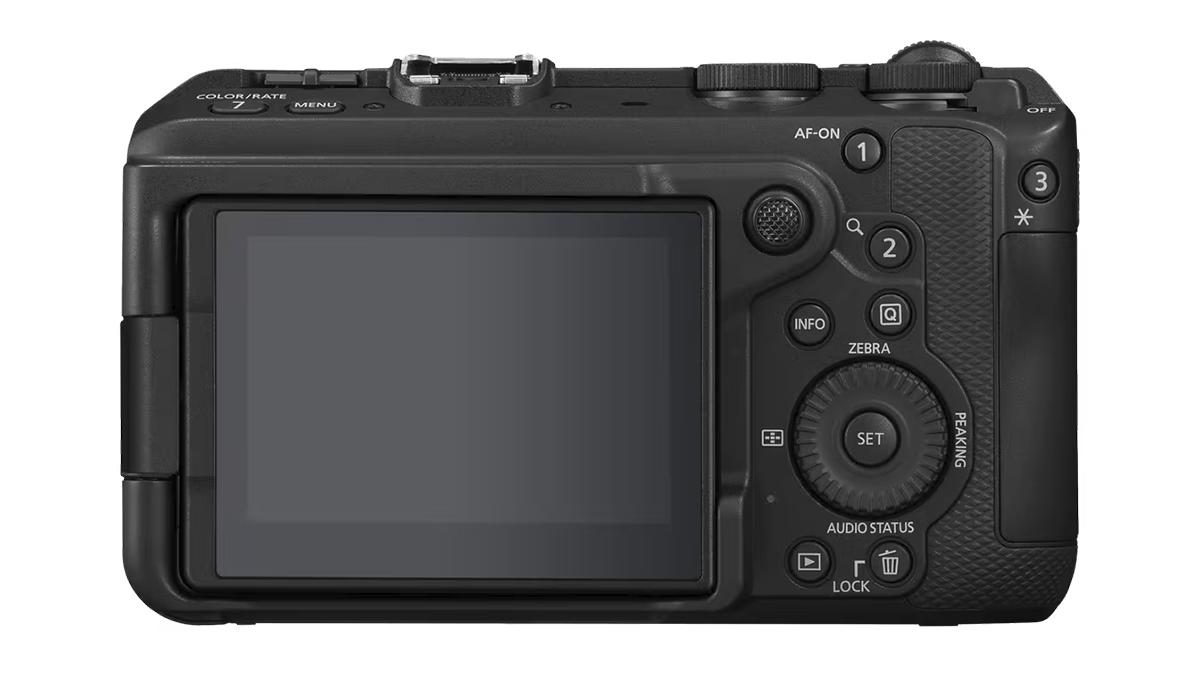
Without a viewfinder, the rear LCD has to do all the work. The R6 V has a 3-inch screen with about 1.62 million dots, and it can be hard to see in bright sun. There’s no eyepiece to fall back on.
You can crank the brightness or add an external monitor. A monitor adds weight and another battery to charge. Then come the cables and a mount. Your small camera starts getting bigger. That’s fine on a larger rig. It’s less appealing when you bought the R6 V to stay small. We’d have liked a larger or brighter display on a camera this focused on video.
Full-size HDMI is the right choice
Canon gave the R6 V a full-size HDMI port.
Thank you, Canon.
Smaller cameras often use tiny HDMI ports that are easier to damage and easier to pull loose. A full-size connector is a much better choice for production.
The R6 V can send high-quality video to compatible external recorders, including ProRes RAW, and timecode can ride along in the HDMI signal. There’s no dedicated timecode input, though, so you can’t jam it to a shared timecode system. A solo shooter may never care. A multicamera production might.
Audio is good, but this is not a cinema camera
Audio comes in through a 3.5 mm microphone jack, with a headphone jack for monitoring. Canon’s multi-function shoe also supports compatible digital audio accessories. That’s enough for plenty of small productions.
You don’t get built-in XLR inputs, so a pro audio setup means more gear. It’s one of several reminders that the R6 V isn’t a Cinema EOS camera. It borrows from one. It doesn’t replace one.
CFexpress and SD make a good pair
The R6 V has one CFexpress Type B slot and one UHS-II SD slot. CFexpress is fast enough for the camera’s heaviest recording modes, but it’s expensive. SD cards cost less and work well when you don’t need the speed.
The camera can also record proxies in supported modes. You edit the small proxy files, then switch back to the originals for the final export. If you shoot a lot of 7K, proxies stop being a nice extra. They make the edit far more manageable.
The R6 V still does not replace a cinema camera
Canon packed a lot of cinema-style features into this body. A few important ones are still missing. There are no built-in ND filters, which cut light without shifting color. Think of them as sunglasses for your lens. There are no XLR inputs and no timecode input.
Start adding an external monitor and an audio adapter. Bolt on ND filters and a wireless video system. Add a bigger battery and a cage, and your small R6 V stops looking small. At some point, a purpose-built cinema camera makes more sense.
The reverse is true too. Try putting a big cinema camera on a small gimbal or mounting one inside a car. Try carrying one around all day by yourself. Small cameras solve problems as well.
Final thoughts
The Canon EOS R6 V is at its best once you look past the biggest numbers on the spec sheet. Yes, it records 7K RAW, and that’s impressive. The camera works because its features solve real production problems.
False color and the waveform help you nail exposure. Canon Log 2 leaves room in the grade, and autofocus can take over when you can’t pull focus yourself. IBIS helps handheld. The cooling fan makes long recording sessions realistic, while pre-recording covers the moments you can’t predict. Open gate gives you room when one shoot has to become several videos.
Then there are the compromises. 4K Fine adds detail, but its readout is about twice as slow as standard 4K. Open gate adds cropping room along with more rolling shutter. RAW gives you control and huge files. Digital stabilization smooths the image but crops the frame. There’s no shutter angle control or EVF. You won’t find built-in ND or a timecode input either, and the rear screen struggles in bright light.
Those are real weaknesses. Nearly all of them have a clear workaround, and that’s what we like best about the R6 V.
It gives you choices.
Shoot standard 4K when you need fast readout. Pick 4K Fine for detail and 4K 120p for slow motion. Use open gate when one shot needs several versions. Record RAW when the project benefits from it, and fall back to 10-bit compressed video when RAW would slow you down.
The best camera isn’t the one with the biggest number on the box. It’s the one that hands you the right tool for the shot in front of you.
The R6 V does that well.
It sits between Canon’s mirrorless cameras and its Cinema EOS line. For solo shooters and wedding filmmakers, that’s a comfortable spot. Documentary crews will like it there, too. Content creators and small production teams may find it’s exactly where they want to be.
Canon calls the R6 V a video-first camera. This time, the claim feels earned. It isn’t perfect, and it doesn’t need to be. It needs to help you get the shot, and it does.
Strengths
- Internal 7K RAW and 7K open gate
- Uncropped 4K at up to 119.9 fps with fast readout
- False color, waveform and zebras built in
- Cooling fan and six-hour clip limit for long shoots
- Full-size HDMI with ProRes RAW output
Weaknesses
- No EVF, and the rear screen struggles in bright sun
- 4K Fine and open gate show more rolling shutter
- No built-in ND, XLR or timecode input
- 7K RAW files fill cards fast
Tech specs
| Lens Mount | Canon RF |
| Effective Sensor Resolution | 32.5 MP (6960 × 4640) |
| Actual Sensor Resolution | 34.2 MP |
| Image Sensor | 35.9 × 23.9 mm Full-Frame CMOS |
| Image Stabilization | Sensor-Shift IBIS, up to 7.5 stops (center) |
| Shutter Type | Electronic Rolling Shutter |
| Shutter Speed | 1/8000 sec to 30 sec |
| ISO Sensitivity (Photo) | 100-64,000 Native (50-102,400 Expanded) |
| ISO Sensitivity (Video) | 100-25,600 Native |
| Still Image Formats | C-RAW, HEIF, JPEG |
| Still Image Bit Depth | 12-Bit |
| Aspect Ratios | 1:1, 3:2, 4:3, 16:9 |
| Maximum Internal Video Recording | RAW 12-Bit: Up to 7K (6960 × 4640) open gate at 29.97 fps; 7K RAW Light (6960 × 3672) up to 59.94 fps H.264 XF-AVC S 8/10-Bit: Up to 7K at 29.97 fps H.265 XF-HEVC S 10-Bit: Up to 7K at 29.97 fps |
| Maximum Video Output | ProRes RAW via HDMI to a compatible recorder, 7K at up to 29.97 fps; uncompressed 4:2:2 10-bit |
| Maximum 4K Recording | DCI 4K (4096 × 2160): Up to 120 fps UHD 4K (3840 × 2160): Up to 120 fps |
| Maximum HD Recording | 2K (2048 × 1080): Up to 180 fps Full HD (1920 × 1080): Up to 180 fps |
| Gamma Profiles | Canon Log 2, Canon Log 3, HDR-HLG, HDR-PQ, Rec.709 |
| Recording Limit | 6 Hours (under 100 fps), 2 Hours (100 fps and above) |
| IP Streaming | MJPEG up to 4K 59.94p |
| Built-In Microphone | Stereo |
| Audio Recording | 4-Channel 24-Bit LPCM (RAW) 2-Channel 16-Bit AAC |
| Memory Card Slot 1 | CFexpress Type B |
| Memory Card Slot 2 | SD/SDHC/SDXC UHS-II |
| Internal Storage | None |
| Video Output | 1× HDMI |
| Headphone Output | 1× 3.5 mm Stereo |
| Microphone Input | 1× 3.5 mm Stereo |
| Power Input | USB-C |
| Data Output | USB-C 3.2 Gen 2 |
| Remote Port | 2.5 mm Sub-Mini |
| Wireless Connectivity | Wi-Fi 5 (802.11ac), Bluetooth 5.1 |
| Mobile App | Canon Camera Connect (iOS & Android) |
| GPS | Via Connected Smartphone |
| LCD Display | 3-inch Articulating Touchscreen |
| LCD Resolution | 1.62 Million Dots |
| Focus Type | Auto & Manual (Dual Pixel CMOS AF II) |
| Focus Modes | AF-C, AF-S, Manual, Subject Tracking |
| Battery | Canon LP-E6P, 2130 mAh |
| Tripod Mounts | Bottom: 1/4″-20 Side: 1/4″-20 |
| Operating Temperature | 32°F to 104°F (0°C to 40°C) |
| Construction | Aluminum, Magnesium Alloy, Polycarbonate |
| Dimensions | 5.6 × 3.3 × 3.1 in (141.8 × 83.3 × 79.7 mm) |
| Weight (Body Only) | 598 g (1.32 lb) |
| Weight (With Battery & Media) | 688 g (1.52 lb) |

