

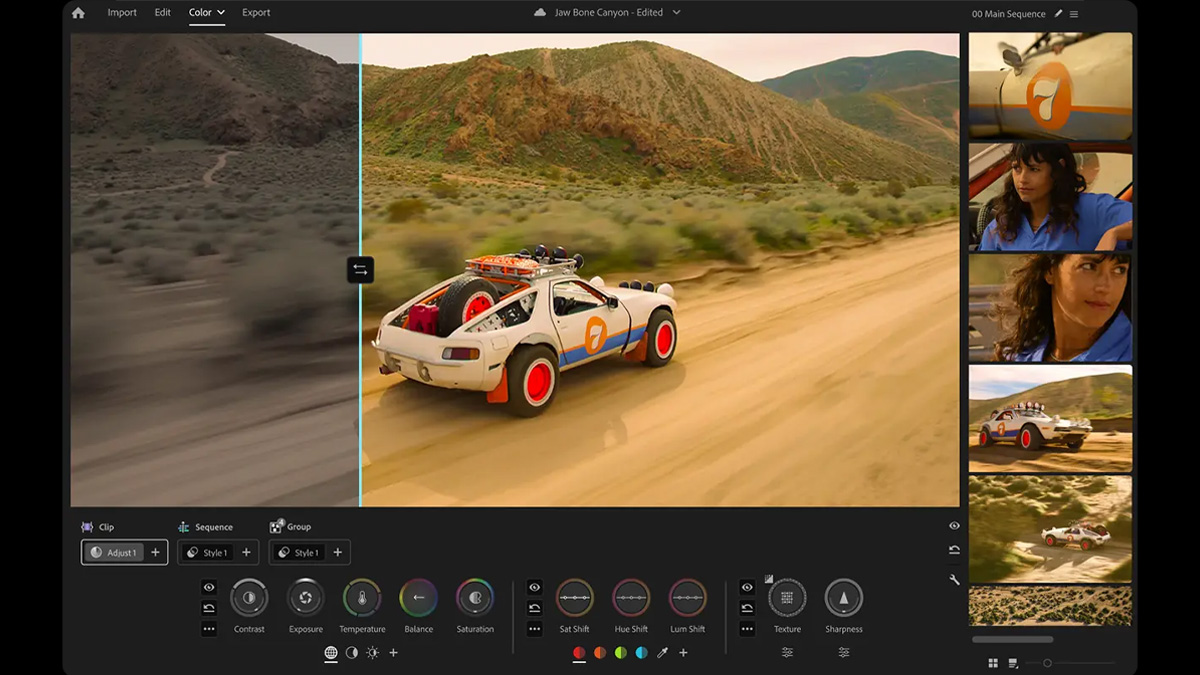
Adobe has released Premiere 27.0 with a new Color Mode page for color grading. It replaces the older Lumetri tools, which you applied to your video as an effect. The update also brings several AI powered tools.
Color Mode
Open a project in Premiere 27.0 and you will see a new Color option at the top of the screen. It sits alongside Import, Edit and Export. Click it to reach the Color Mode page.
A large monitor window fills the middle, with thumbnails of your sequence clips down the right side. A timeline ruler and playback controls sit under the monitor. Color wheels and other grading controls run across the lower part of the screen.
Bidirectional controls
Color Mode gives you controls for contrast, exposure, color temperature, color balance and saturation. You can also adjust color shift, texture and sharpness. They look like the color wheels in other grading software, but most of them are bidirectional. Move your mouse up and down for one setting. Move it left and right for another.
Take the temperature control. Vertical movement changes color temperature while horizontal movement adjusts tint. The exposure control works the same way, with vertical movement for exposure and horizontal movement for black levels.

Head-up display
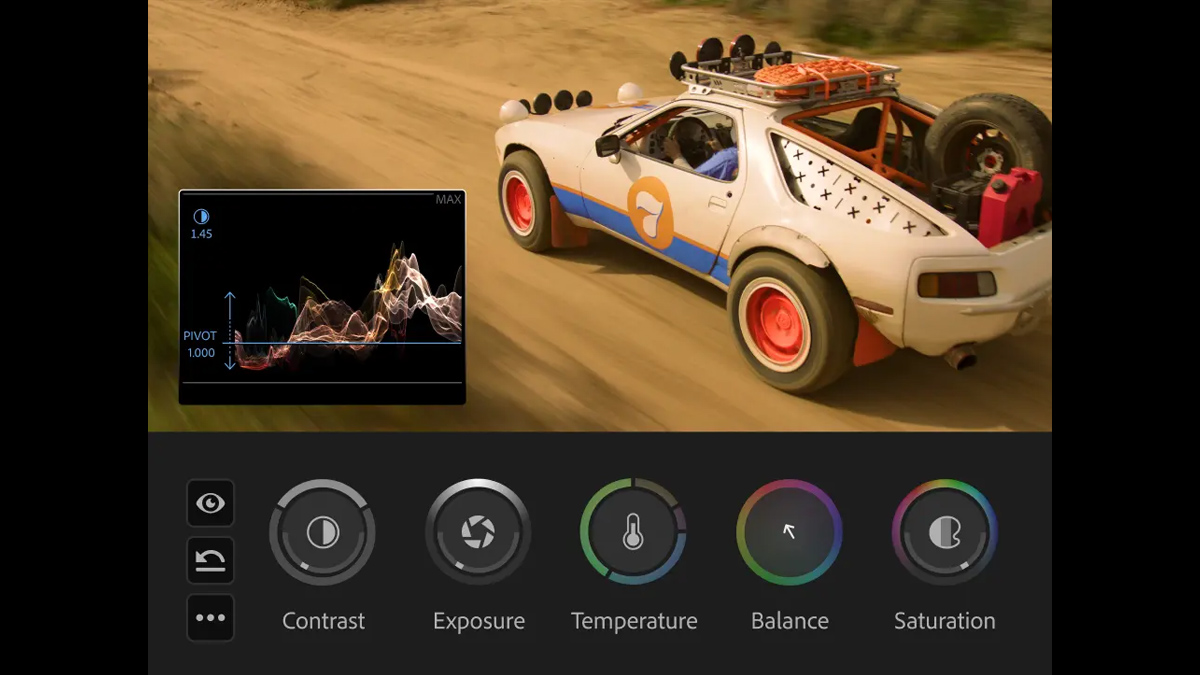
Each control opens its own heads-up display with scopes, numeric info and real-time animated feedback. Adjust contrast or exposure and a waveform appears. Switch to color temperature and you get a vectorscope.
You can change the whole image or target only the shadows or highlights. Custom zones are possible too. Sample the luminance range to pick the exact part of the image you want to affect.
Operations
Color Mode organizes your changes into operations such as adjustments, styles and LUTs. A clip, group or sequence can hold as many operations as you like. They work much like nodes in DaVinci Resolve. One operation might correct contrast and exposure while another handles color balance.
Rename operations to show what they do and toggle each one on or off. Drag and drop or copy and paste them between clips, groups and sequences. You can also build a group style and apply it to multiple clips with a few clicks.
New AI features
Premiere 27.0 also adds AI powered tools. Adobe’s Creative Agent assistant can organize footage in bins or add markers from simple natural language prompts.
A new Generative Media Tool creates video clips for your timeline. It can also generate sound effects and background music. The tool runs on Adobe Firefly, or you can pick alternative AI models from Google, Runway or Luma. AI audio separation splits a recording into individual stems, which helps when two people talk over each other.
What we think
Premiere is still the most widely used video editing software, with an estimated market share of around 35%. Color grading inside the program was limited to the basic Lumetri effect, so many users exported projects to DaVinci Resolve to finish. Adobe seems to acknowledge this in its Color Mode marketing: “Color your videos like an editor right in Premiere.”
Color Mode is a huge improvement on Lumetri. It borrows some of the best parts of Resolve in a layout that will feel more natural to Premiere users. Operations work like Resolve’s nodes but look less daunting at first. Color Mode will not replace Resolve for grading Hollywood movies any time soon. For many editors, though, it covers everything they need.
Availability
Premiere 27.0 is available to download and install now. You need an active subscription to the Premiere app or to Adobe’s full Creative Cloud suite.


